
 Cas Alderman
If you're still chasing client feedback across email threads, unlisted YouTube links, and copy-pasted timecodes, you're losing hours every week. Online proofing software exists to fix exactly that problem — and in 2026, the options have never been better.
But not all platforms are built the same. Some are purpose-built for video teams. Others are optimized for documents, packaging, or enterprise compliance. Choosing the wrong one means frustrated reviewers, clunky workflows, and rounds of revisions that could have been half as painful.
This guide breaks down what online proofing software actually is, what separates the great tools from the merely adequate ones, and why Wipster remains the standout choice for video teams and creative agencies in 2026.
What Is Online Proofing Software?
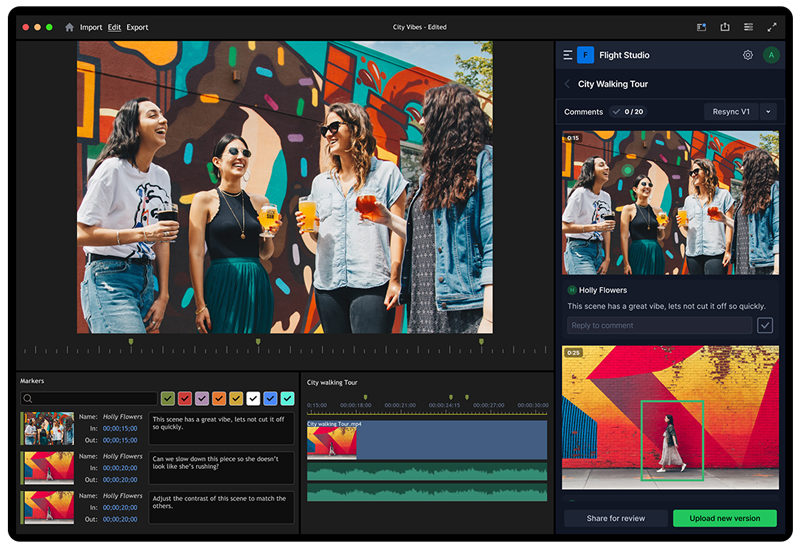
Online proofing software replaces the back-and-forth of email-based feedback with a centralized platform where stakeholders can review, annotate, and approve creative assets directly. Instead of a client watching a video, writing up timestamped notes in a Word doc or email, and emailing them back, they simply click on the video at the exact moment they want to flag, and the feedback is instantly visible to the entire team.
These platforms have become the standard for video team and deliver a host of benefits. A strong online proofing platform typically supports:
- In-context visual feedback pinned to the exact frame, pixel, or word
- Version control so teams can compare drafts and avoid working off stale files
- Approval tracking with a clear record of who signed off and when
- Multiple file types (video, image, PDF, audio, and more)
- Integrations with the creative tools and storage platforms teams already use
For video teams specifically, the most critical feature is frame-accurate commenting, which places feedback and revision notes in context. Comments are tied to exact timecodes, not vague descriptions like "around the 30-second mark."
The Best Online Proofing Tools in 2026
Here's an honest look at the leading platforms, who they're built for, and where they fall short.
1. Wipster — Best for Video Teams and Creative Agencies
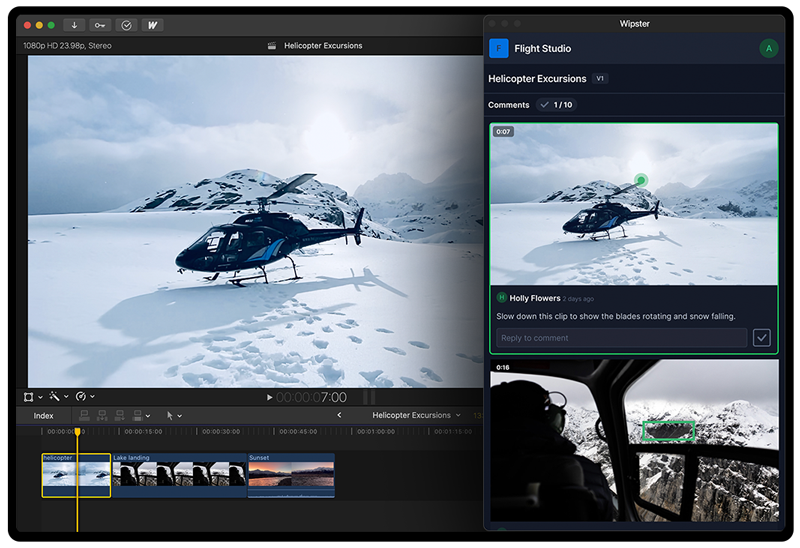
Wipster is purpose-built for creative teams who live and breathe video. It covers the full review lifecycle: upload your WIPs, invite collaborators, collect frame-accurate feedback, manage version cycles, and deliver finished work, all in one place.
Why Wipster leads for video teams:
- Frame-accurate commenting: reviewers click directly on the timeline to pin feedback to the exact moment, eliminating the guesswork that plagues email-based reviews.
- Unlimited reviewers: clients, stakeholders, and approvers never need a paid seat to leave feedback, which is critical for agencies managing multiple clients with multiple internal approvers.
- Editing suite integration: Premiere Pro, After Effects, and Final Cut Pro panels let editors receive comments as timeline markers and respond to feedback without ever leaving their editing suite.
- Version management: side-by-side version comparison lets teams see exactly what changed across drafts and track changes across versions.
- Project organization: campaign-level folders keep all assets, versions, and feedback in one place across the full production lifecycle
- Enterprise-ready: SSO, org-level administration, and dedicated support for larger teams, without the enterprise price tag of competitors
Best for: Creative agencies, in-house video teams, educational institutions, and any team that needs a fast, intuitive review experience, especially when working with clients who aren't technically savvy.
The Wipster difference: While competing platforms treat video as one of many asset types they support, Wipster was built with video at its core. That focus shows up in the editor integrations, the comment experience, and the simplicity of the reviewer interface. Clients who have never used a proofing tool can navigate Wipster without training, which matters more than most teams realize until they're chasing a deadline.
2. Frame.io — Best for High-End Post-Production
Frame.io is the dominant player in professional post-production circles, and it earns that reputation. It offers frame-accurate feedback, C2C camera-to-cloud support, and deep integration with Adobe Creative Cloud. It's the platform of choice for broadcast, streaming, and premium commercial work.
The trade-off is complexity and cost. Frame.io is a more heavyweight tool, and its learning curve (plus Adobe's tightening integration of Frame.io into the Creative Cloud ecosystem) can make it overkill for teams whose primary need is a clean, fast client review experience rather than a full post-production infrastructure.
Best for: Broadcast and streaming productions, large post-production houses, teams already embedded in the Adobe Creative Cloud ecosystem.
3. Filestage — Best for Mixed-Media Marketing Teams
Filestage is a well-rounded proofing platform that handles video, PDFs, images, audio, and web pages under one roof. Its dashboard gives project-level visibility at a glance, and the interface is clean enough that reviewers can jump in without a learning curve. It supports unlimited reviewers on all plans.
The limitation for dedicated video teams is that Filestage is optimized for broad asset coverage rather than video-first workflows. Frame-accurate commenting exists, but the experience isn't as refined as a platform built specifically for video. For teams producing a high volume of video alongside other content types, this can be a meaningful gap.
Best for: Marketing agencies and brand teams that review diverse asset types (not just video) and need one platform to handle all of them.
4. Ziflow — Best for Enterprise Compliance
Ziflow is built for organizations that need governance, compliance, and audit-ready workflows. It supports over 1,200 file formats, offers SOC 2 and ISO 27001 certification, e-signatures, and advanced conditional logic for multi-stage approval workflows. If you're in a regulated industry or need a full audit trail for every creative decision, Ziflow is worth serious consideration.
The trade-off is accessibility. Ziflow's pricing scales with seat count, the interface has a steeper learning curve than most competitors, and advanced features are gated behind higher-tier plans. For smaller agencies or teams with external reviewers who aren't technically confident, the overhead can slow things down rather than speed them up.
Best for: Enterprise marketing teams, regulated industries, and organizations that need compliance-grade approvals.
5. Vimeo Review — Best for Teams Already on Vimeo
If your team already pays for Vimeo, its built-in review tools are a convenient, zero-friction option for basic feedback collection. You get timecoded comments, approval tracking, and password-protected sharing, which is enough for simple review cycles.
The limitations surface quickly for growing teams. Version control is limited, task management is minimal, and there are no deep editor integrations. Vimeo Review is a solid "good enough" option for light use cases, but purpose-built platforms will serve any team with serious production volume significantly better.
Best for: Teams already using Vimeo for hosting who want basic review capabilities without a separate subscription.
6. SyncSketch — Best for Animation and VFX
SyncSketch is a specialized tool for animation studios, VFX houses, and game development teams. Its standout feature is real-time whiteboard-style annotation, allowing reviewers to draw directly over frames rather than typing text comments. It supports synchronized playback and is built for the specific demands of frame-by-frame visual review in complex production pipelines.
It's not designed for general video production or agency-client workflows, but for its target audience it's best-in-class.
Best for: Animation, VFX, and game development teams with complex frame-level review needs.
How to Choose the Right Online Proofing Tool
Here's a simple framework:
You produce primarily video → Wipster. Frame-accurate comments, unlimited reviewers, editor integrations, and a client-friendly interface make it the clear choice for video-first teams. Agencies especially benefit from the multi-team organization and the fact that clients never need a paid seat.
You need compliance and enterprise governance → Ziflow. If audit trails, e-signatures, and regulatory compliance are non-negotiable, Ziflow is built for that environment.
You review diverse file types beyond video → Filestage. For mixed-media marketing teams juggling videos alongside PDFs, images, and web assets, Filestage offers the broadest asset coverage with the lowest friction.
You're in high-end post-production → Frame.io. For broadcast, streaming, and productions that need the deepest Adobe integration and camera-to-cloud capability.
You're on a tight budget and already use Vimeo → Vimeo Review. As a starting point, not a long-term solution for growing teams.
Why Wipster Is Built for the Way Video Teams Actually Work
The challenge most video teams is engaging with stakeholders and managing feedback efficiently. Clients send notes over email. Stakeholders give conflicting direction. Editors work off the wrong version. Rounds of revisions pile up because no one can see what's been actioned and what hasn't.
Wipster was built to solve that specific set of problems. When a client clicks on a moment in a video and leaves a comment, that comment becomes an actionable task in the editor's queue which is visible to everyone, tied to a timecode, trackable through to resolution. When a new version is uploaded, the old feedback doesn't disappear; it's preserved for comparison. When a project is finally approved, the full review history is intact.
For agencies managing dozens of client projects simultaneously, that kind of clarity is the difference between delivering on time and losing a client.
Ready to see the difference? Start a free trial of Wipster and experience what a video review workflow looks like when it actually works.