 Cas Alderman
Ask any video editor what the most frustrating part of their job is, and very few will say the editing.
Instead, what you hear most often is that the most challenging aspect of the work, with the most friction, is the feedback and revision process.
Not because editors hate receiving feedback, or can't work with others. But the format that video feedback comes to the editor is inconsistent and requires a huge amount of wrangling and clarification. Editors find themselves peering through emails and listening to voice notes, just to find notes like "the pacing feels a bit slow in the middle section" or "can we make the colour grade feel warmer, you know, more cinematic?"
Everywhere you look, clients and stakeholders are giving video feedback in formats that were never designed for video. When that feedback isn't anchored to a specific frame, editors spend more time interpreting notes than they do actually making edits.
Frame-accurate video review changes that. Here's what it actually means, why it matters, and how tools like Wipster bring it directly into the editing suite. The distance between feedback and fix collapses to almost nothing.
What "Frame-Accurate" Actually Means
Every video is a sequence of individual frames (typically 24, 25, or 30 per second depending on the format). When a reviewer watches a video in a dedicated proofing tool, they can pause playback at any point and leave a comment pinned to that exact frame and timecode.
So instead of: "Around the 1:30 mark, something feels off with the cut"
You get: "01:28:14 — the cut here is too abrupt, the outgoing clip needs a few more frames before the cut point"
The difference in clarity and specificity is huge. One note sends the editor on a detective hunt, while the other tells them exactly where to go and what to fix. At 24 frames per second, the gap between "around 1:30" and "01:28:14" is 48 individual frames of ambiguity.
For a single project, that might cost an editor 20 minutes. Across a team running 10 concurrent projects, each with multiple revision rounds and multiple reviewers, the hours lost to vague feedback add up fast.
Why Vague Feedback Is Worse Than No Feedback
When feedback is imprecise, editors face a difficult choice: make their best guess at what the reviewer meant, or go back and forth asking clarifying questions.
When an editor makes revisions that miss the mark, that means another round of feedback, another revision cycle, more time lost on both sides. Alternatively, if the editor goes back for clarification, everything slows down. Reviewers start to expect their notes will require a follow-up conversation before anything happens.
Neither outcome is what anyone wants. Reviewers aren't giving vague feedback deliberately. But they are giving that feedback through tools (email, messaging apps, phone calls) that simply can't encode the specificity that video review requires. There's no way to paste a timecode into an email and have it mean something. There's no way to click on a frame in a PDF and leave a note.
Frame-accurate commenting removes that structural limitation. Reviewers can only leave a comment on a specific moment in the video because the tool has the precision built-in.
What Frame-Accurate Commenting Looks Like in Practice
In a tool like Wipster, the review experience works like this:
A reviewer receives a link. They don't need to sign up an account or download an app. They click through, watch the video, and when they see something they want to comment on, they click or tap anywhere on the video player. Playback pauses and a comment box appears. Their note is automatically timestamped and pinned to the exact frame.
On the editor's side, every comment that arrives has a timecode attached. They can scroll through a list of notes and jump directly to the frame in question with a single click. Or using Wipster's editor integrations, those timecodes come directly into their editing suite.
Comments can be replied to, marked as addressed, and resolved with a clear audit trail of what happened and who signed off. Feedback is embedded in the work rather than buried in email and slack threads.
How Wipster Brings Review Into the Edit Suite
Most video review tools are web platforms that sit alongside an editor's workflow. Wipster goes further: its integrations for Adobe Premiere Pro, Adobe After Effects, and Final Cut Pro bring the entire review process directly into the editing environment.
Adobe Premiere Pro
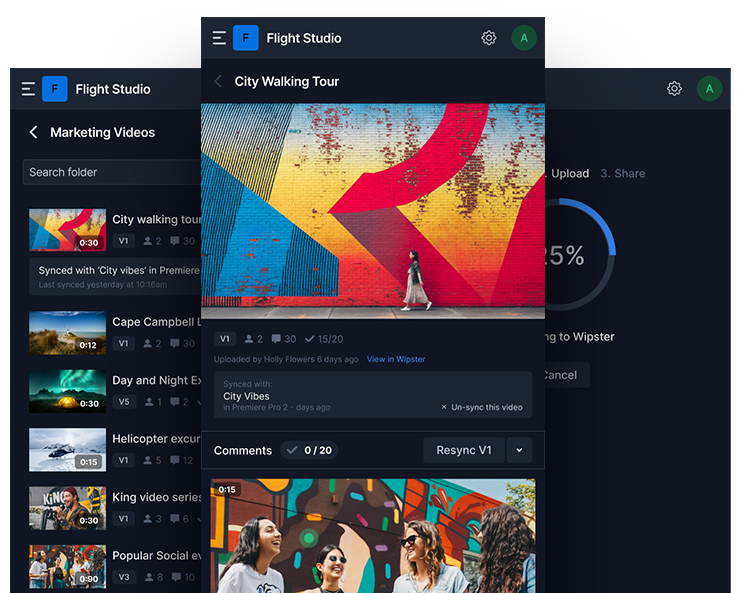
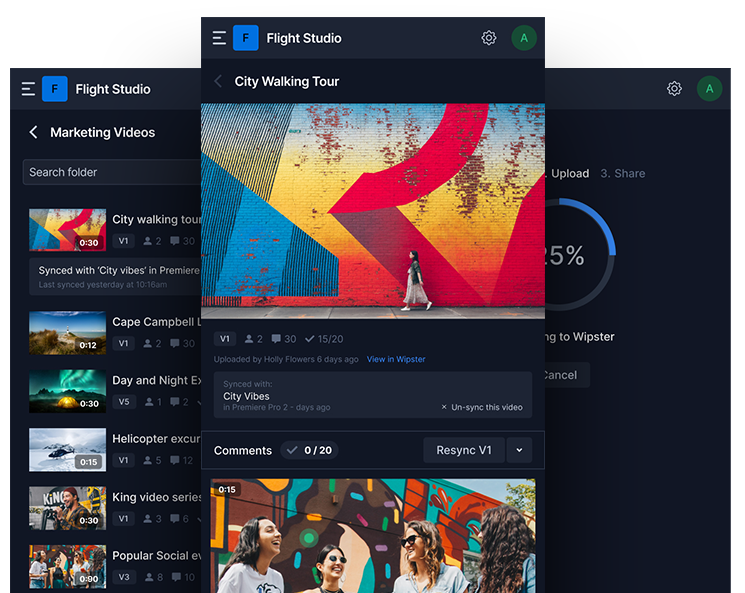
The Wipster Review Panel installs directly into Premiere Pro. From a single panel inside the application, editors can upload a sequence to Wipster, send review notifications to stakeholders, and receive comments back without ever leaving the timeline. When feedback arrives, each comment appears with its timecode, and editors can navigate directly to the flagged frame, make the edit, and check the note off as resolved. The upload, the sharing, and the collating of feedback all happen behind the scenes.
Adobe After Effects
For motion graphics and VFX work, the same panel is available in After Effects. Once a comp is sent out for review, comments from clients and colleagues are automatically added as markers on the After Effects timeline. Editors can reply to each comment and check items off the to-do list from within the application. No switching between tools, no cross-referencing email threads with a timeline on another screen.
Final Cut Pro
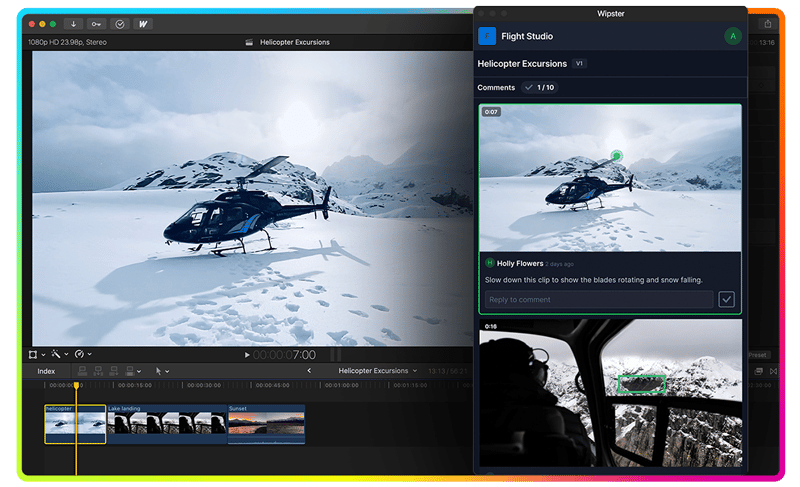
The Wipster extension for Final Cut Pro functions similiarly. Comments and notes sync directly into the FCP timeline, making it immediately clear where each piece of feedback applies in the edit. Editors can view time-coded comments, reply to notes, and mark tasks as complete, all from within Final Cut Pro. No app-switching. No losing track of which version a note was left on.
The practical effect of all three integrations is the same: the feedback and the fix happen in the same environment. An editor doesn't need to have Wipster open in a browser tab alongside their NLE, mentally translating a list of timestamps into edit points. The comments are already there, in the timeline, waiting.
Why This Matters More as Teams Scale
For a solo editor working with one client on one project at a time, the difference between email feedback and frame-accurate commenting is significant but manageable. You can piece together a revision list from a long email thread if you have to.
For a team running multiple projects simultaneously the compounding effect of imprecise feedback becomes much more costly. Each project has its own stakeholders, revision history and approval status. Version confusion, duplicate revision work, missed notes, and approval delays all trace back, at least in part, to feedback that wasn't specific enough in the first place.
Frame-accurate commenting makes individual edits faster. But it also makes the whole review process legible for editors, project managers, and clients, and anyone else who needs to understand what was agreed, changed, and signed off. That legibility is what allows video production to scale without the chaos scaling alongside it.
Start Reviewing Frame by Frame
Wipster's editor integrations for Premiere Pro, After Effects, and Final Cut Pro are available on all plans. Set up a project, invite a reviewer, and see how much of your revision cycle disappears when feedback is pinned to the exact frame it's about.
View Wipster's FCP Integration

View Wipster's Adobe Integration

Start your free trial. No credit card required!

Related reading: